Slides
List page
Section titled “List page”Slides list supports:
- Create deck metadata
- Search/sort
- Edit/delete deck
- Status indicators (draft, processing, ready, failed)
Deck detail workspace
Section titled “Deck detail workspace”Sections:
- Upload
- Presenter page control
- Preview
Upload accepts:
- PPT
- PPTX
- ODP
- KEY
Conversion model
Section titled “Conversion model”- PDF uploads can be published directly.
- Presentation formats are converted in background.
- Status and errors are shown in deck detail and display pages.
Presenter page control
Section titled “Presenter page control”Host can:
- Set page number
- Go previous/next
- Push a specific page
Locked display viewers follow this current page.
Screenshot: Slide upload and page push
Section titled “Screenshot: Slide upload and page push”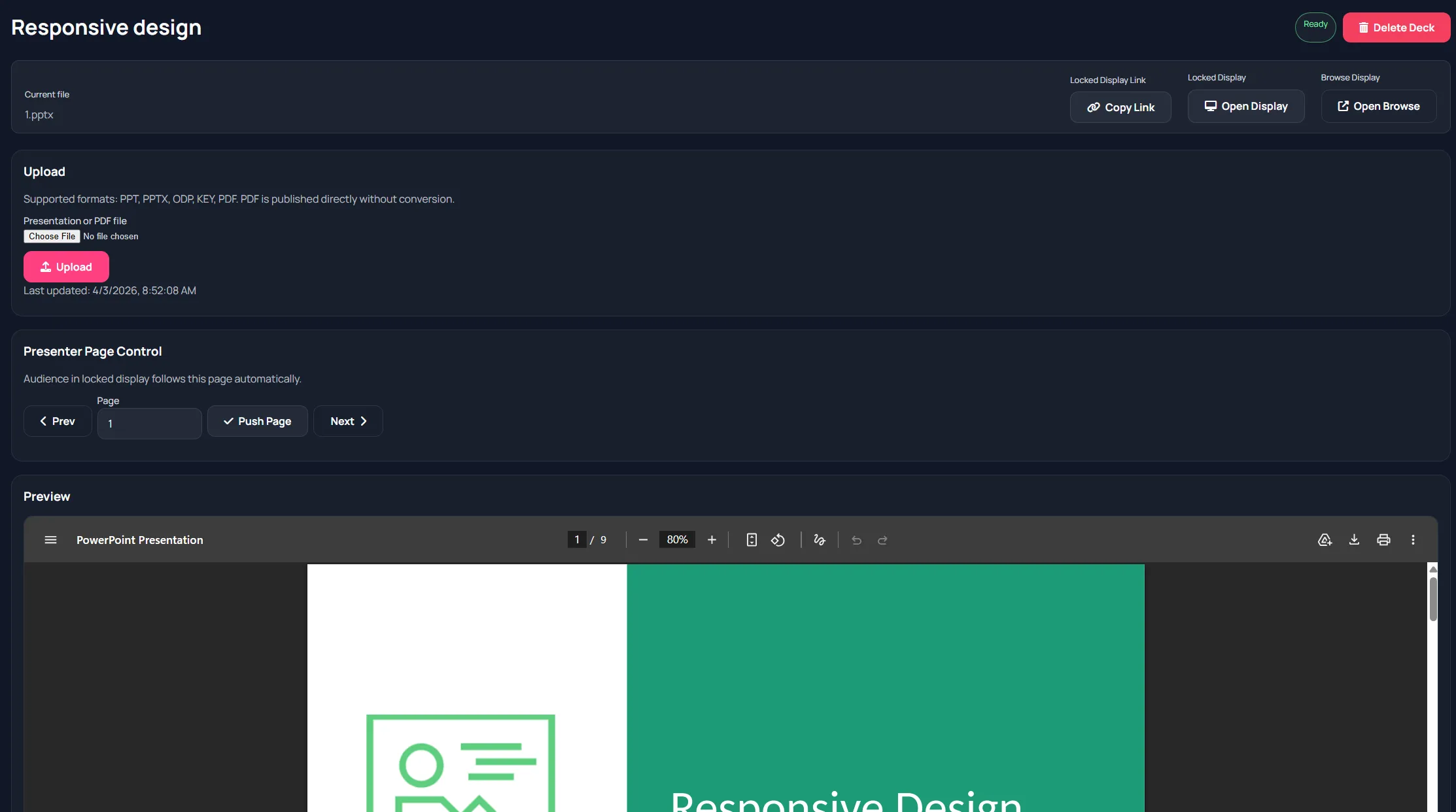
Display variants
Section titled “Display variants”- Locked display: controlled by host page changes
- Browse display: independent browsing view
Host checklist
Section titled “Host checklist”- Upload deck before session.
- Wait for ready status.
- Validate preview.
- Share locked display link.
- Drive pages from presenter control panel.